

Sometimes it happens that you want to transfer your services to another provider because the current one no longer meets your needs. This can also happen for web services such as email, cloud storage and hosting (the space where your website is hosted with all its contents).
The first thing requested to be able to transfer your website is the Auth Code, the authorization code to transfer the domain.
In this article you will discover how to proceed to retrieve this essential code in order to transfer your domain.
What is the Auth Code or Authorization Code and what does it do?
The Auth Code (short for Authorization Code), also known as EPP code, is a unique code that acts like a domain password and belongs to the user who registered the domain. This code is an alphanumeric combination (letters and numbers) ranging from 6 to 16 digits.
In case of domain transfer, the Auth Code serves as proof of transfer authorization.
The new provider needs this proof to host the domain on their server.
Only in this way can it be ensured that you are indeed the owner of the domain you wish to transfer, for which reason the Auth Code is a very personal code that excludes the possibility that someone with malicious intent could take your domain. Therefore, requesting the Auth Code is the first step in every domain transfer.
How to get the Auth Code or EPP Code
Sometimes it happens that you want to transfer your services to another provider because the current one no longer meets your needs. This can also happen for web services such as email, cloud storage and hosting (the space where your website is hosted with all its contents).
The first thing requested to be able to transfer your website is the Auth Code, the authorization code to transfer the domain.
How to get the Auth Code or EPP Code from Register
If your current provider is Register.it, obtaining the Auth Code or EPP Code is as simple as following these steps. Go to the Register.it site and log in to the Customer Area of Register. Then from the active Products section, click on the name of the domain you want to transfer, which you can find listed under the ‘Domains & Products’ heading as shown in the image below.
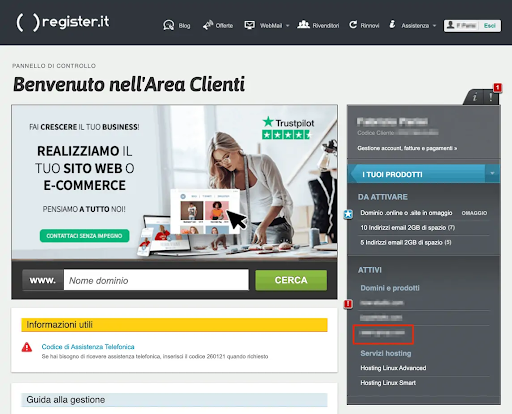
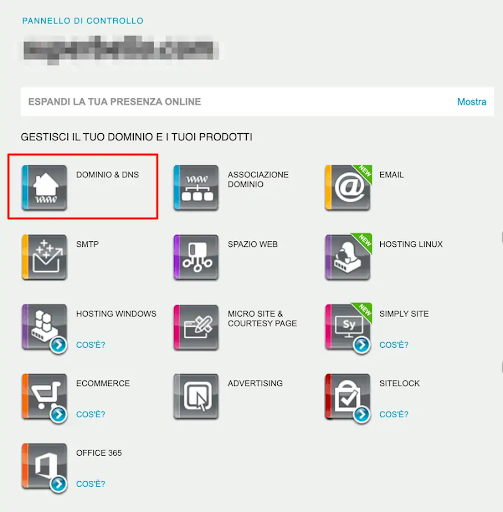
So you will access the domain and product management section, and then click on Domain & DNS, as indicated below.
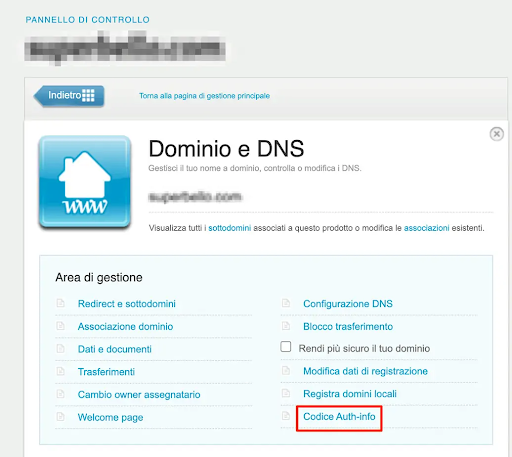
Then click on Auth-info Code to proceed, as shown in the image below.
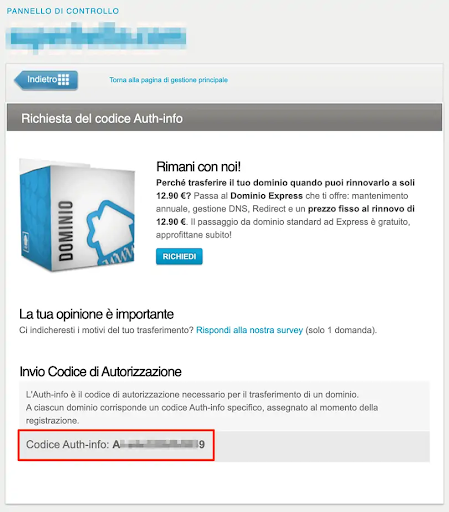
If you own a .com, .org or .net domain, you can view the Auth Code directly on the page that opens after clicking on Auth-info Code, as shown in the image below.
In other cases, such as for .it domains, on the page you will see a button with “Send code” written on it. Through this, you can request the sending of the Auth Code to your email address provided during domain registration.
In the event that you cannot directly retrieve the Auth Code from Register, we recommend opening a support ticket from your control panel and specifying in the subject “Domain” and “Auth-info”.
Note that if you want to transfer a domain from Register, you will first need to unlock it. To do this, access the domain management section, click on Domain & DNS, then click on Transfer Lock.
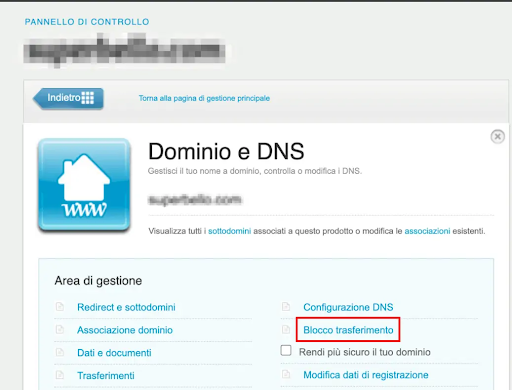
From this section (for domains where transfer lock is applicable, e.g. .com), you can deactivate the transfer lock to be able to transfer your domain.
The domain lock protects against accidental or unauthorized transfers, so you should only deactivate it when you are really sure you want to transfer your domain.
While the domain lock is active, you cannot modify the DNS and registration data of the domain, including the process of changing the domain owner. If instead you have made changes in the last 60 days, the domain will be automatically locked and you will need to wait for the term to expire as per ICANN regulations.
Continue Reading